
K v0.1 beta · Mac · Local-first foundation

From thought
to action.

One voice assistant for all your work apps. Say what needs to happen and Keldr drafts it, shows you exactly what it'll do, and gets it done — across Gmail, Slack, Notion, and the rest of your stack.
Hold ⌃ space · Preview before execute · Audit everything
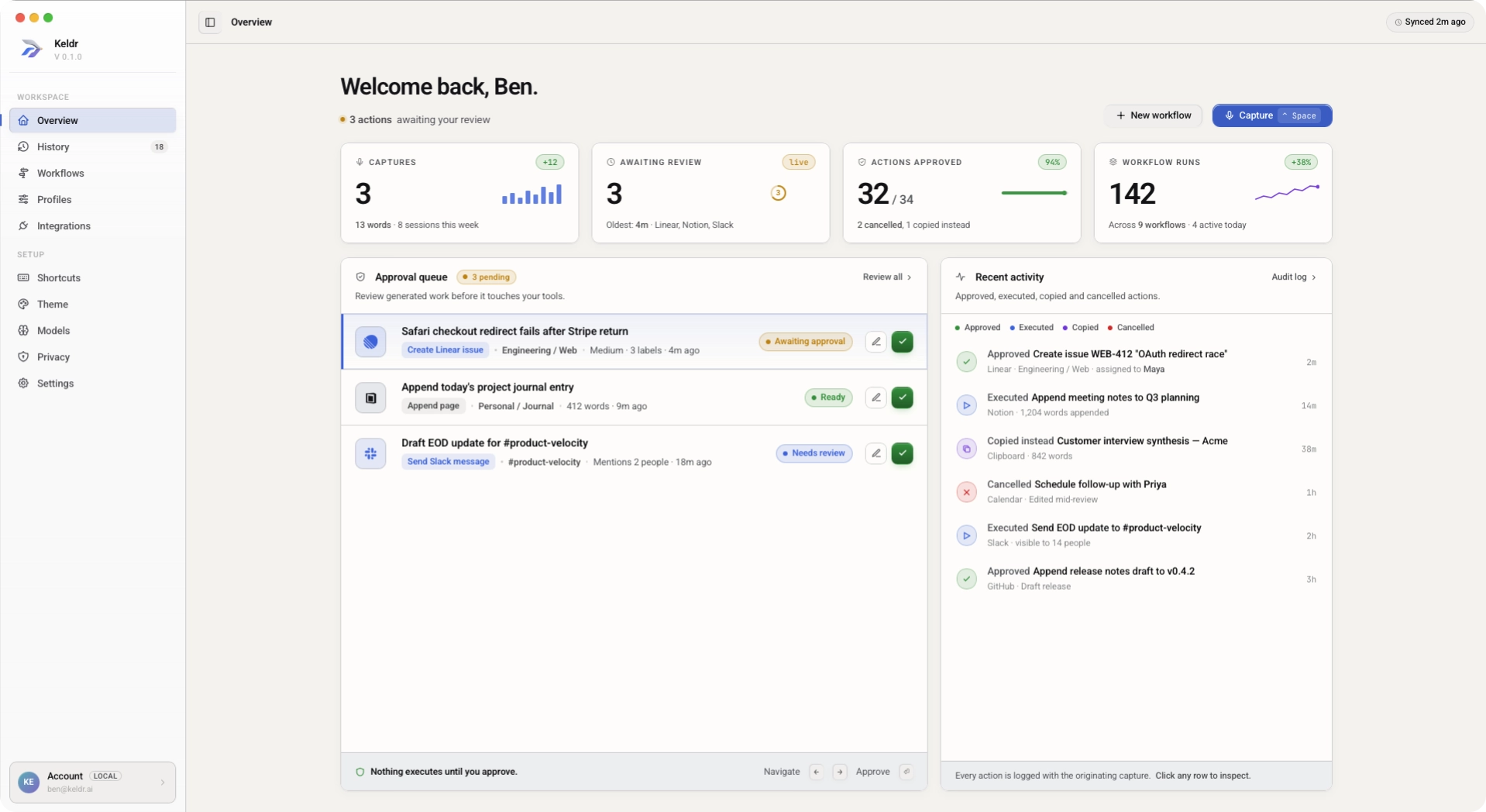
Keldr desktop app overview showing captures, workflow runs, approval queue, and recent activity
The voice-to-action loop
Capture
Speak from the menu bar or shortcut.
Structure
Keldr figures out what you meant and where it goes.
Review
See exactly what will happen before it runs.
Execute
Keldr sends, saves, or schedules it in your apps.
Audit
Keep a history of what was approved, skipped, or copied.
Why Keldr

One voice. Every tool.
Zero juggling.

Stop bouncing between AI tabs and copy-pasting between apps. Speak what needs to happen — Keldr drafts the message, the task, the update, and gets it done where your work already lives.

Trigger
Inbox · new email
Memory
Customer history
Agent · Triager
gpt-omega · 0.2
Approve
Human review
Reply
Send & log
Foundation
Dictation, done right.

Local transcription where your cursor is. The foundation — not the product.

Actions / day 8,412 +24%
388 · May 1
Approved 92.4%
Edited 6.1%
Cancelled 1.5%
Speed
At the speed you talk.

Sub-200ms capture. Sub-second structuring. You move at conversational speed — and the output reads like a second pass.

M
Refund request · $284.00
Agent · Tier 2 · confidence 71%
Needs review
Customer reports product missing from order #A8214. Account in good standing, previous claims: 0. Proposed action: full refund + replacement.
Pricing change · acme.co 2m
Outbound email · enterprise 6m
Speak. Review. Done.
Nothing happens without you.

Keldr drafts the email, the task, the calendar invite — and shows you exactly what it's about to do. One tap to approve, edit, or cancel. Always.

Your voice profile
2,184 captures
Direct Warm Plain language
Aa
"EOD" end of day
learned
M
"Maya" Maya Chen · Engineering
learned
Sounds like you
Drafts in your voice.

Keldr learns your tone, your phrases, your team's names. Every draft reads like you wrote it — because you basically did.

Where your voice went today
100% on your computer 0 KB to cloud
Processed on-device
14 captures today · none uploaded
now
No recordings kept
Discarded after transcription
always
Yours alone
Private by design.

Your voice never leaves your computer unless you want it to. No recordings stored. No training on your data. Ever.

P
Planner
Refund needs CRM context + policy lookup.
Routing to Researcher, then Writer.
R
Researcher
Found order #A8214. Policy 3.2 applies. tool: crm.read
W
Writer
Like talking to an assistant
A real conversation — not a chat window.

Talk to Keldr the way you'd brief an assistant. It asks the right questions, drafts the work, and shows it to you to approve before anything goes out.

KGmailSlackNotionLinearCalendarHubSpot
OAuth · scoped · 120+ apps · Audit log
Works where you already work
Your apps, finally talking to each other.

Keldr lives alongside Gmail, Slack, Notion, Word, your calendar, your docs, your CRM, and the rest of the tools your team already uses. The work still lands in the apps you trust — Keldr just gets it there faster.

Compatibility

Works in the apps
you already use.

From a quick voice note to a drafted follow-up email, a calendar invite, a CRM update, a Slack reply. Same shortcut, different outcomes — and you always see it before it goes out.

See full app coverage If you can type in it, Keldr works in it.
Where you write
  • EM Email
  • DO Docs
  • NO Notes
  • SL Slack & chat
  • CO Comments & replies
Where you run the day
  • CA Calendar
  • CR CRM
  • PR Project tracker
  • SP Spreadsheets
  • BR Browser tabs
Where it lives

One voice.
All your apps.

Keldr connects to the tools you already use — email, calendar, docs, chat, CRM, project trackers. Your work still lands where it always has. Keldr just gets it there faster.

Connected
Voice in your pocket
Capture thoughts on the move and find them formatted in your inbox.
A
B
C
Airpods Connected
Full power at your desk
Dictate, refine, and route work with one shortcut in any app.
Headphones
Hands-free anywhere
Speak naturally through AirPods, headsets, or your built-in mic.
Connected
Works with your stack
Connects to Gmail, Slack, Notion, Word, and the other tools your team already uses. No setup wizard — just speak, and Keldr meets you in the app.
You're in control
Nothing happens without you
Every action shows you a preview first. Edit it, send it, or cancel — Keldr only goes when you say go.
Always a record
See what got done
Every action is saved to a simple history you can scroll back through. Find what you sent last Tuesday. Undo what you wish you hadn't.

Start local. Scale to the operating layer.

Choose a plan that works best for you and your team.

No hidden fees.

Free

Try it. Keep it. Forever.

$0
Forever
Unlimited dictation in any app on your computer
5 ready-to-use recipes (email drafts, notes, follow-ups)
2 recipes you can tweak to fit your work
Runs entirely on your computer — your voice stays yours
Mac, Windows, iOS, and Android

Pro

For people who get real work done by voice

$15
Per month · $129/yr
Everything in Free
Talk to Keldr like an assistant — not just dictation
Unlimited custom recipes — Keldr sets them up for you
Connect Gmail, Slack, Notion, Word, and the rest of your tools
See a preview of every action before it runs
Full history of everything Keldr has done — search, replay, undo

Team

One voice across the whole team

$29
Per user / month
Everything in Pro, per seat
Share recipes across the team
Team-wide history — search what anyone shipped
Centralised app connections & approvals
Admin, billing, and single sign-on

Enterprise

SSO, data residency, custom voice models, and dedicated support — for organisations that need voice to operate inside their security boundary.

Audit log API & retention controls
SAML SSO and SCIM
On-prem or VPC deployment
Custom data residency
Dedicated support engineer
Custom legal and DPA
Custom voice models
99.9% uptime SLA
FAQ

Frequently Asked Questions

What it does today. How your voice is kept private. What you can expect next.

Keldr is a voice assistant for your everyday work. You say what needs to happen — "send Maria the project update," "add this to my Monday tasks," "draft a follow-up to yesterday's call" — and Keldr does it. You see exactly what it's about to do before it goes out, and there's a record of everything afterwards.

Just say it.
Keldr does it.

Hold ⌃ space and talk like you would to a colleague. Keldr drafts the email, the task, the follow-up — and shows you what it'll do before it does it.

Download for free
14
8,412
$0.018
"